Strategy
Portfolio Management – strategic control over value.
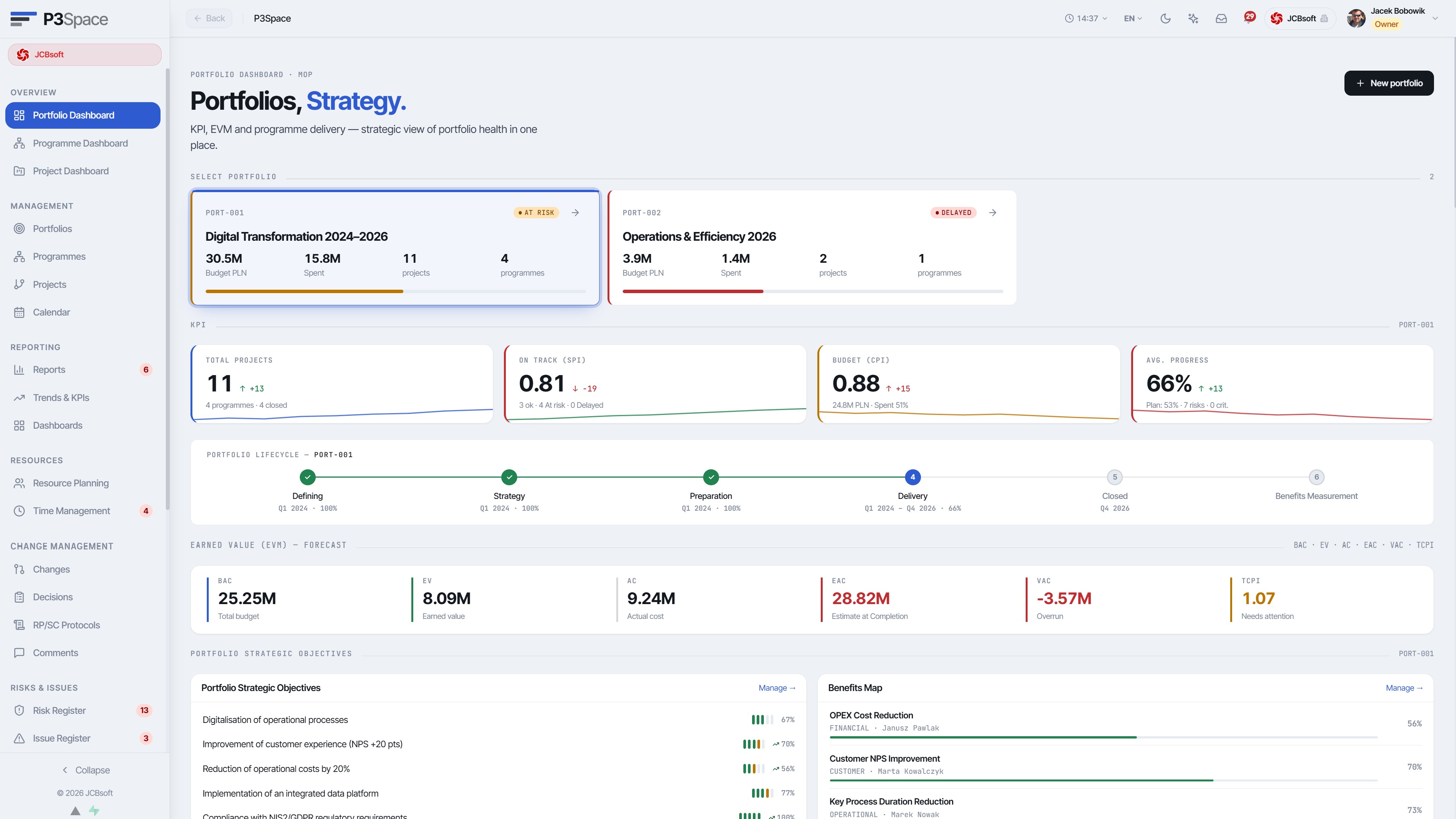
The investment-decision layer. P3Space presents the portfolio as a single living organism: budget, progress, benefits map, earned value (EVM) and strategic goals – all synchronised with the layers below.
- 01
Multi-portfolio hierarchyUnlimited portfolios, each with its own budget, sponsor and goals. Consolidated at Space level.
- 02
EVM ForecastingEAC, VAC, TCPI, BAC, EV, AC – calculated automatically from project data, no manual reporting.
- 03
Benefits mapOKR and business-benefit tracking with timestamps, status ("On Track / At Risk / Achieved") and a measurable value.
- 04
Strategic goalsPortfolio goals list (e.g. NIS2/GDPR, OPEX, NPS) with assignment to programmes and projects.
- 05
Value vs. Effort & roadmapInitiative prioritisation matrix – sponsors see where real value lies.
- 06
Portfolio RoadmapTimeline view for the entire portfolio – swimlanes per programme and project, milestones, colour-coded by status on a single screen.
- 07
What-if simulatorLevers on projects (on/off, budget ±%, delay) with instant impact on budget, EAC forecast, RAG and resources – computed live, with no changes to your data.
app.p3space.io/portfolio/PORT-001
app.p3space.io/portfolio/PORT-001/value-effort
app.p3space.io/portfolio/PORT-001/what-if
Coordination
Programme Management – orchestrating dependencies and tranches.
Programmes in P3Space are more than a folder of projects. They are a declared vision, an architecture blueprint and clearly scoped delivery tranches – with their own metrics and dependency mapping between projects.
- 01
Vision & BlueprintEditable in-place programme artefact: vision statement, architecture diagram, expected benefits realisation.
- 02
Delivery tranchesProgramme stages (Foundation → Integration → Analytics & AI) each with its own status, date and list of constituent projects.
- 03
Dependency mappingDependency graph between projects – blockers, prerequisites, milestones.
- 04
Programme budget consumptionTime-series chart of funds spent, broken down by project.
- 05
Programme health scoreComposite indicator (time, cost, risk, quality) calculated from projects within the programme.
app.p3space.io/programme/PROG-001
app.p3space.io/programme/PROG-001/dependencies
Delivery
Project Delivery – Kanban, Gantt, list. Your choice, one core.
Run every project in the mode that suits it – Hybrid, Agile, Waterfall – without migrating data. The same phases (Initiation → Preparation → Delivery → Closure) across three complementary views.
- 01
Three views, one datasetKanban (per phase), filterable list and management board – switch in 1 click.
- 02
Contextual filtersPortfolio, programme, phase, status, owner, work mode – all in one bar.
- 03
Project modesHybrid / Agile / Waterfall – per project, with adapted task workflow.
- 04
Agile Board, sprints & backlogSprint board (Kanban per sprint), drag-and-drop backlog prioritisation, planning modal, burndown and velocity charts, team capacity per sprint.
- 05
Gantt with baselineBaseline vs. actuals, milestones, dependencies and critical path.
app.p3space.io/projects?view=kanban
app.p3space.io/project/TD-002/gantt
Operational core
Work Engine – status, workflow and automation engine.
Beneath every PPM layer sits a configurable engine: define statuses, transitions, roles, escalations and SLAs – without code. Workflow is per Space, so each On-Prem customer can have their own.
- 01
Status configuratorBuild your own state diagrams per object type (project, task, risk, change).
- 02
Automation rulesTriggers + conditions + actions. E.g. "if SPI < 0.7 – change status to At Risk and notify the sponsor".
- 03
SLA & escalationsResponse times per status with automatic escalation to a higher role.
- 04
Multi-step approvalsBudget, change and report approval paths – with history and audit trail.
app.p3space.io/admin/workflows/project-status
People registry
People registry – identity separated from access and capacity.
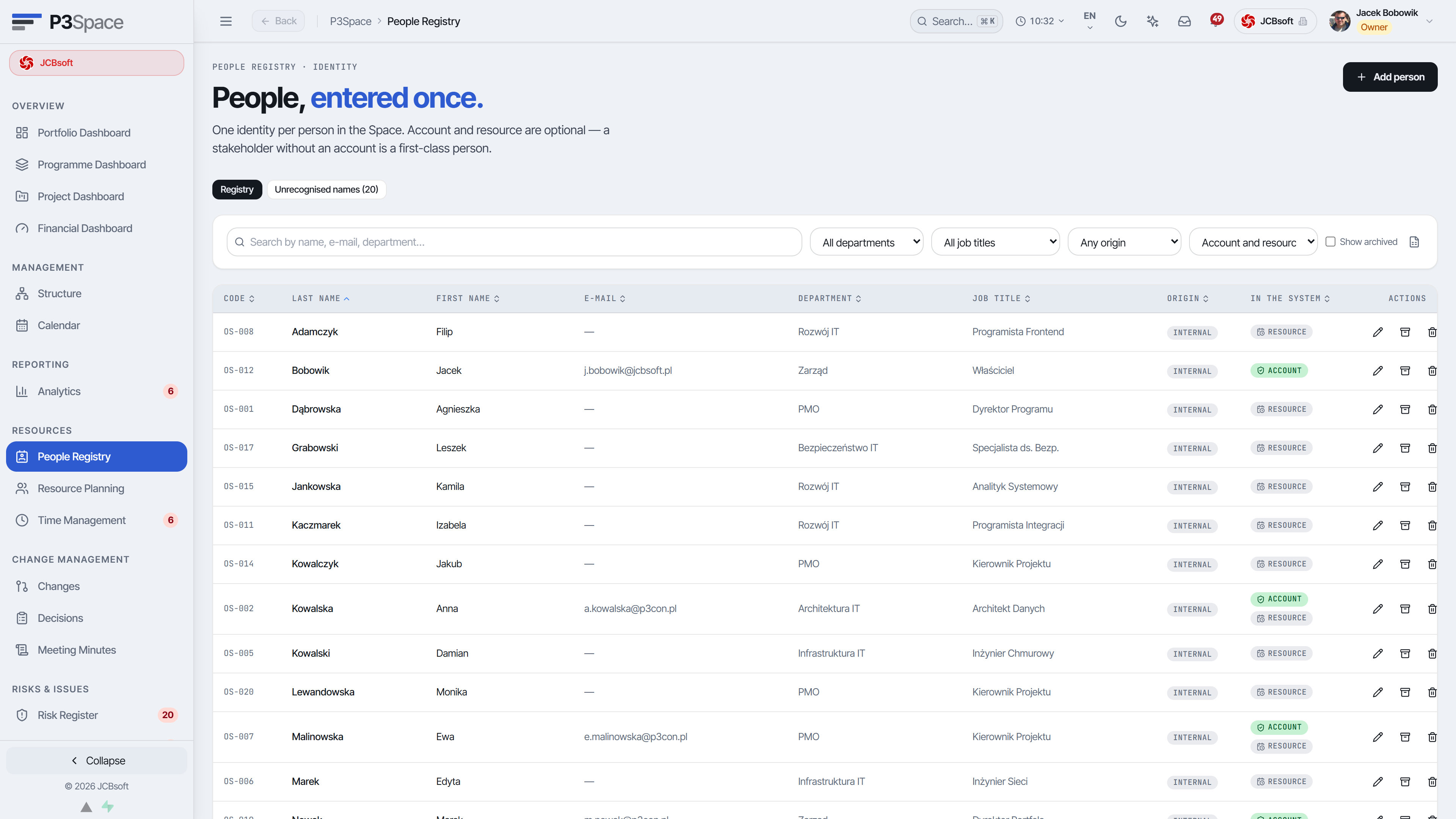
P3Space models a person independently from a user account and a resource record. This keeps governance clear when a stakeholder needs visibility, but no login or delivery capacity.
- 01
PersonIdentity, organisation, roles and relationships.
- 02
AccountOptional system login, permissions and audit trail.
- 03
ResourceOptional capacity, skills, rates and assignments.
- 04
StakeholderA named participant can receive portal access without an account.
AI · PPM
AI risk scan – signals from portfolio data, ready for a decision.
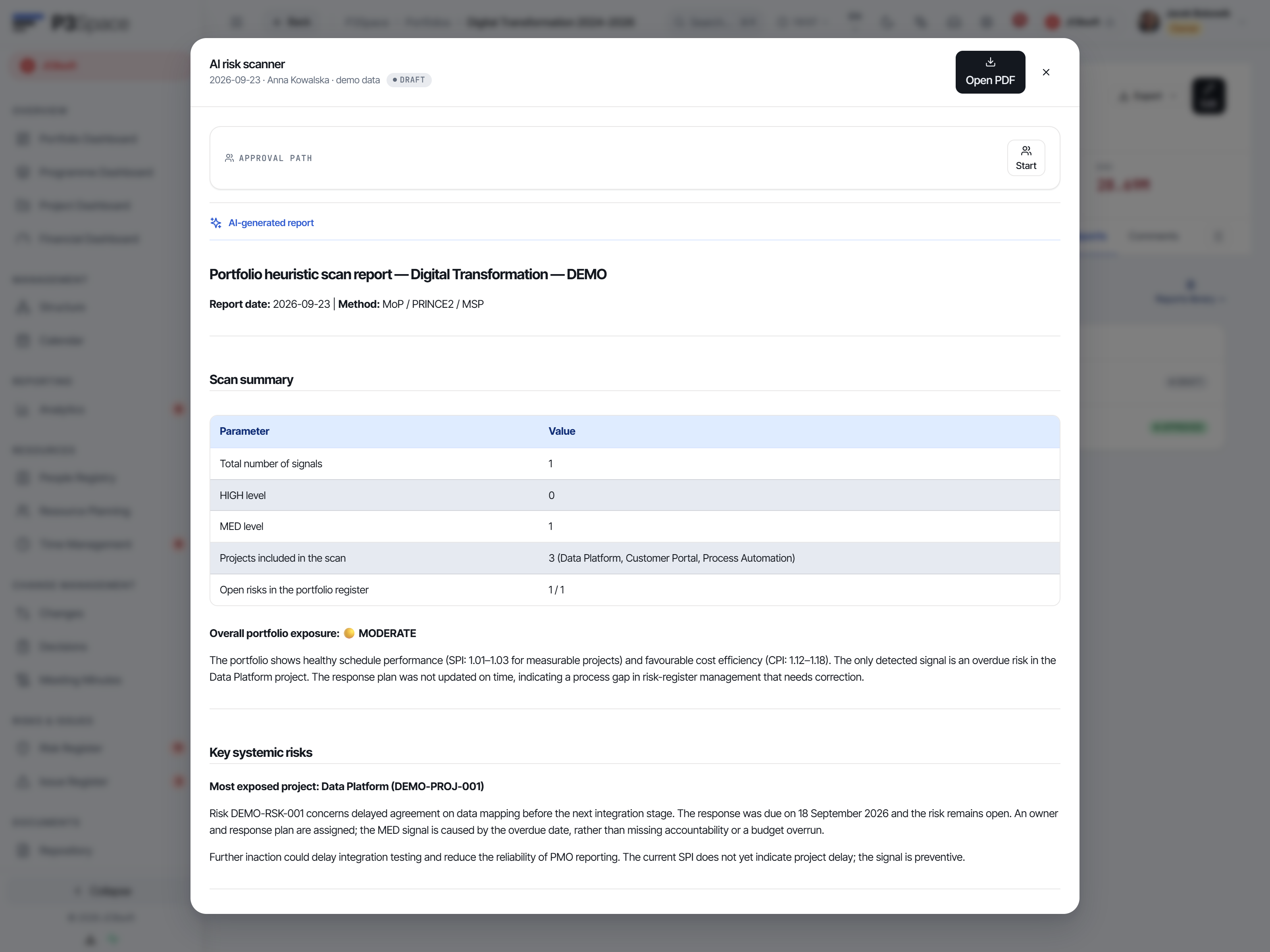
The scanner combines deterministic PPM heuristics with an AI narrative. It highlights schedule, cost, ownership and scope signals, then prepares an actionable report without changing source data.
- 01
Portfolio scanSPI, CPI, open risks, changes and ownership are checked across initiatives.
- 02
Prioritised signalsHIGH, MED and LOW findings show affected projects and the underlying condition.
- 03
Management narrativeThe report turns findings into clear observations and recommended next steps.
- 04
Controlled outputReview, copy, export to PDF or save the result in the report library.
From Business
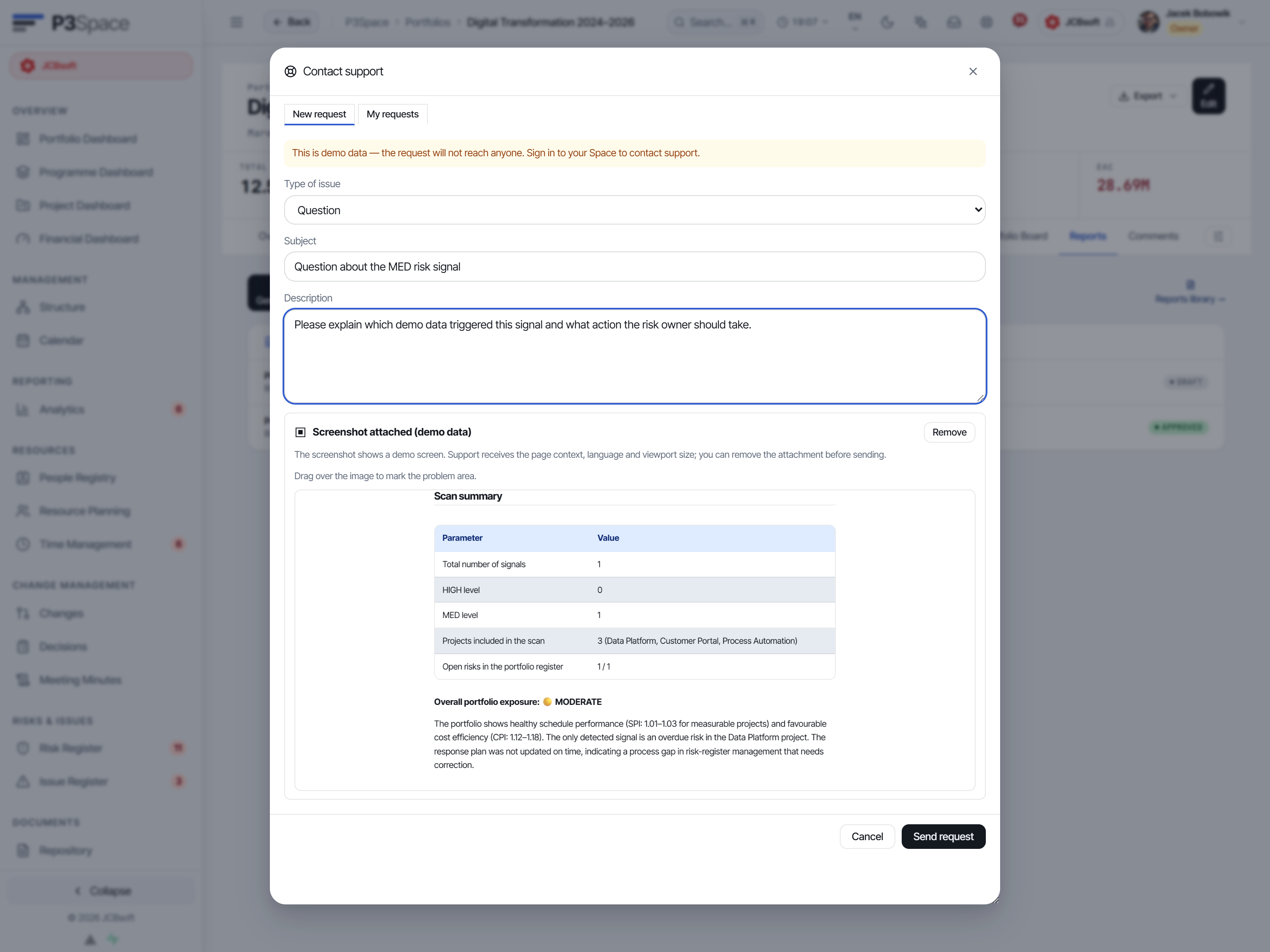
Service desk with the screen context already attached.
From the Business plan, a user can open a service request from any screen. P3Space records the page context and prepares a removable screenshot, reducing the back-and-forth needed to reproduce an issue.
- 01
Available from BusinessThe capability is included in Business and inherited by Enterprise.
- 02
Context in one clickPage, language, viewport and a current screenshot travel with the request.
- 03
Privacy controlThe user previews, marks or removes the screenshot before sending.
- 04
Request historyUsers can review replies and the current status of their own cases.
Resources
Resource Management – capacity, workload, planning.
Know who is available, who is overloaded and where headcount will shortly run short. Plan vs. actuals in one view, broken down by role, department and project.
- 01
Capacity plannerTeam availability heatmap in weekly / monthly view.
- 02
Workload balancingDrag-and-drop hour allocation between projects with overload visualisation.
- 03
Roles & competenciesRequired competencies assigned to project roles – the system suggests matching people.
- 04
Forward planningResource utilisation forecast for the entire portfolio over 3–12 months.
Time tracking
Time tracking and approvals.
Time logging, manager approval, client billing. All connected to the same project and portfolio – no re-keying into Excel.
- 01
TimesheetWeekly timesheet with quick project/task selection, draft + submit flow.
- 02
Multi-step approvalTeam manager → Project manager → Finance control, with comments and history.
- 03
Rates & billingRates per role / person / project, export to client invoicing.
- 04
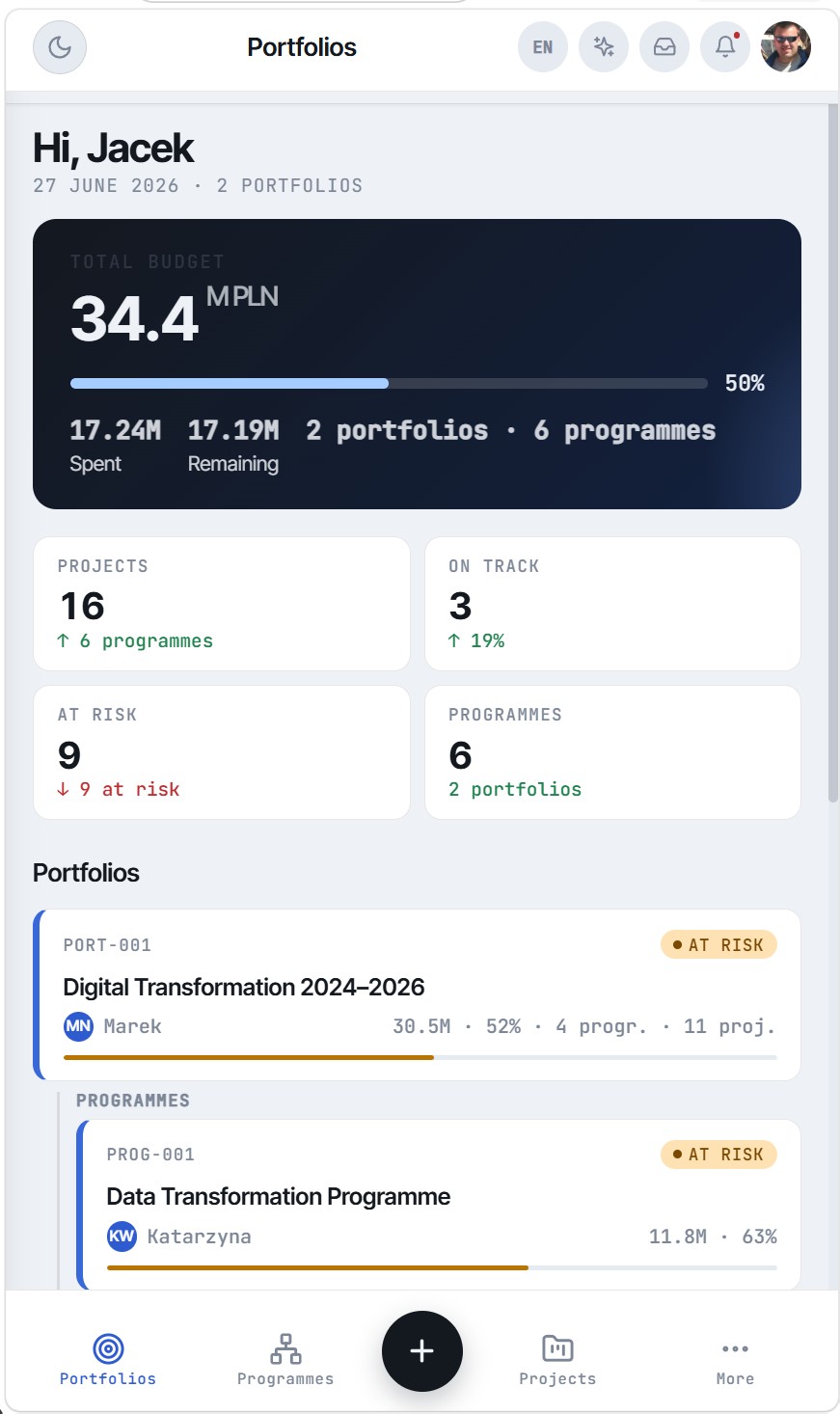
Mobile time loggingPWA – quick entry from a phone, offline-ready with sync.
app.p3space.io/time/timesheet/2026-W18
Analytics
Reports & KPIs – from health score to custom dashboards.
Ready-made management reports and a custom builder – no waiting for the BI team. Trends, indicators. Every report exportable to PDF / XLSX / PPTX with one click.
- 01
Report library~30 ready-made reports: portfolio status, EVM, risks, capacity, project financials.
- 02
Trends & indicatorsSPI/CPI charts over time, delivery progress, team satisfaction (NPS).
- 03
Health scoreComposite health indicator for project / programme / portfolio – with component breakdown.
- 04
Dashboard builderDrag-and-drop widgets, save custom views per role.
- 05
Report generatorStep-by-step ad-hoc wizard + build your own report templates for your organisation.
- 06
Management presentationsReady-made decks for the Portfolio Board, Programme Board and Project Steering Committee – export to PPTX/PDF.
- 07
Export & subscriptionsPDF / XLSX / PPTX, automated scheduled report delivery by email.
app.p3space.io/reports/portfolio-health
app.p3space.io/reports/dashboards
Governance
Change Management – registers, risks, decisions.
Audit-ready governance: every change, decision and risk has an identifier, author, date, status and comment thread. Export to a Steering Committee report – in 3 clicks.
- 01
Change registerChange requests with classification, impact assessment and approval path.
- 02
Decision registerProject / programme / portfolio decisions with rationale and participant list.
- 03
Risk registerProbability × impact scoring, mitigation plan, risk owner.
- 04
Comment historyEvery object has a comment thread with @mentions and attachments.
- 05
Steering Committee minutesAuto-generated SC minutes from decisions + risks + changes for the period.
- 06
Lessons LearnedLessons learned register: problem, root cause, resolution, category. Linked to project and phase, searchable across the entire Space – the PMO's institutional memory.
- 07
Steering Committee presentationSC presentation mode: slideshow with current project status, open risks and decisions – ready to show on screen without exporting to PowerPoint.
app.p3space.io/registers/changes
app.p3space.io/registers/changes
★ P3Space differentiator
i18n / l10n
Multi-language – natively, not as a plugin.
P3Space was designed as a global product from day zero. Language is not just a UI label – it extends to status templates, date formats, currencies, units of measure, PMI/PRINCE2 terminology and the way reports are generated. Each Space selects its default locale, and users can override it individually.
- 01
UI in multiple languagesFull interface translation – menus, labels, messages, validations, system emails.
- 02
Per-Space localisationDate format (DD/MM/YYYY vs. MM/DD/YYYY), currency (PLN, EUR, USD, GBP), time zone, number separators.
- 03
Per-user localisationEach team member can override language and format – without affecting data.
- 04
Reports in any languageExport reports in PL, EN, DE or FR – the report language follows the active interface language.
- 05
Automatic data translation (AI)An entered project description, risk or decision is translated by AI into the other languages; per-Space toggle, with a cost estimate before it runs.
- 06
Terminology dictionaryConcept mapping between PMBOK, PRINCE2, MSP and their equivalents in each language – consistent reporting to different committees.
EN · en-GBEnglishDefault
PL · pl-PLPolski✓ Full support
DE · de-DEDeutsch✓ Full support
FR · fr-FRFrançais✓ Full support
Consistent data model
Language is the presentation layer – data (IDs, dates, amounts) is always the same. Migrating PL → EN requires no rewriting.
Workflow localisation
Statuses "On Track / At Risk / Delayed" have equivalents in every language – with the same semantics throughout.
AI · optional
P3Space Insights – AI assistant for PMO and management.
The Insights layer answers questions that would normally take an analyst two days. "What is slipping and why?", "Which projects are at risk?", "How should we re-prioritise the portfolio?". All in natural language.
- 01
Q&A over the portfolioChat with PMO data – answers citing specific objects (project X, task Y).
- 02
Auto-status summariesGenerated weekly summaries per project / programme / portfolio – ready to paste into an executive email.
- 03
Risk detectionWeak-signal risk detection: SPI/CPI trend, delayed tasks, open CRs without a decision.
- 04
ForecastingOn-time and on-budget prediction based on the organisation's own history.
- 05
Approved AI modelProvider configuration is selected per Space only from options meeting no-training, DPA and retention requirements.
- 06
Privacy-firstSpace data is never used to train or fine-tune models. SaaS uses approved providers, while Enterprise On-Prem can run the model locally.
app.p3space.io/insights/chat
app.p3space.io/insights/chat
Portal
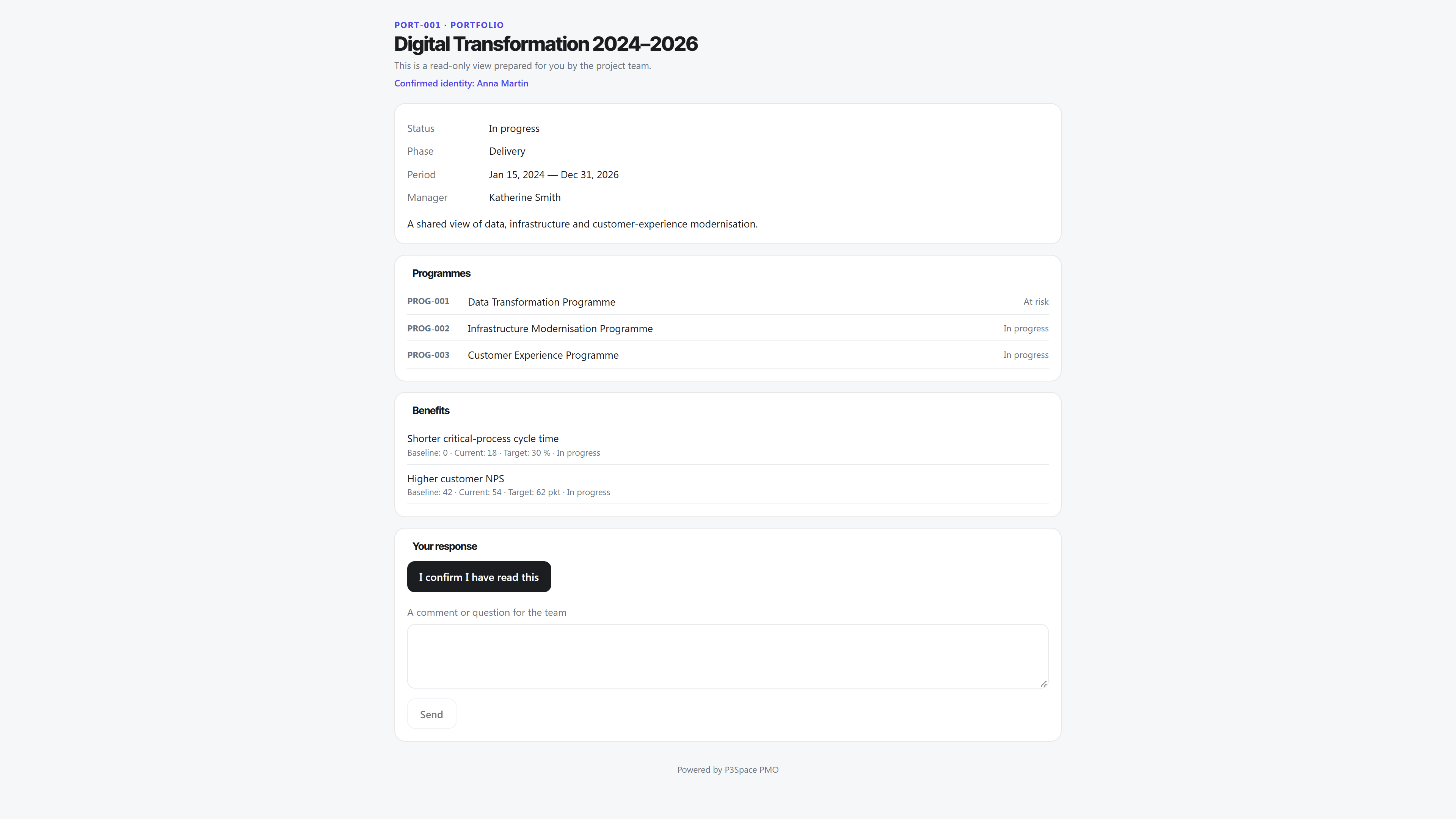
Stakeholder portal – named access without a P3Space account.
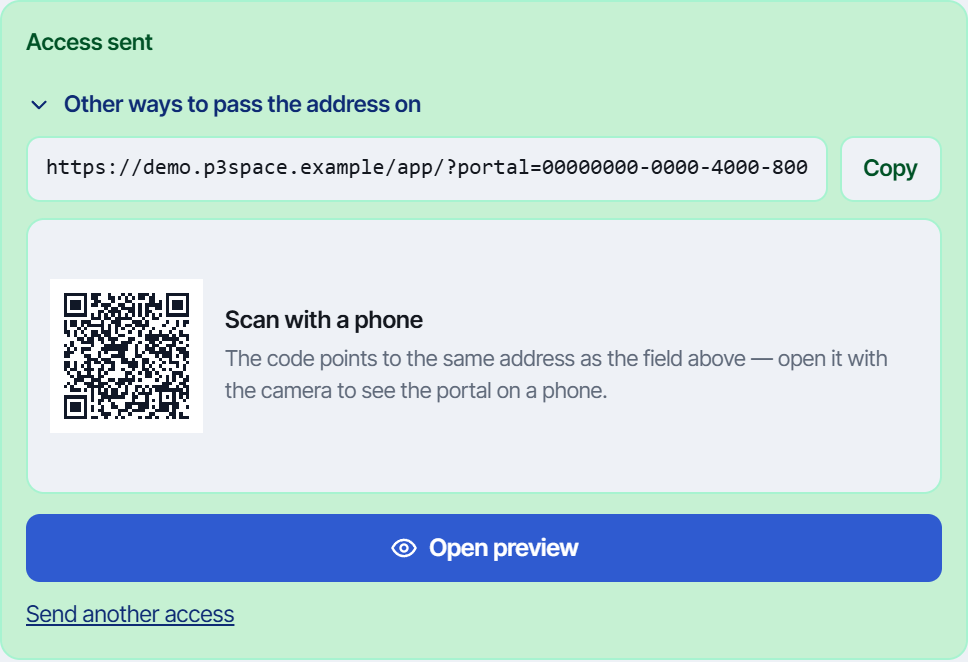
Share a current briefing with a selected person. A QR code opens the invitation, an e-mail code confirms identity, and access remains limited to the approved scope.
- 01
Named recipientChoose a person from the registry instead of creating an anonymous public link.
- 02
QR and e-mail verificationThe invitation can be opened by QR code; a one-time e-mail code verifies the recipient.
- 03
Controlled scopeSelect portfolio, programme or project content, language, expiry and permissions.
- 04
Attributed responsesAcknowledgements, comments and approvals are stored against the verified person.
Planning
Calendar – deadlines, events and schedule in one view.
The central PMO calendar brings all project events together in one place: milestones, SC meetings, phase reviews, risk deadlines and task due dates. Monthly view with ICS export to Google Calendar and Outlook.
- 01
Monthly viewFull-screen month view with colour-coding per event type – instant overview of deadline density.
- 02
6 event typesMilestone, SC meeting, phase review, task deadline, risk due date, custom event – each with its own colour and icon.
- 03
Filter by project / portfolioCalendar scoped to a chosen project, programme or the full portfolio – no noise from unrelated initiatives.
- 04
ICS exportSubscribe to the PMO calendar in Google Calendar, Outlook or Apple Calendar – schedule always up to date, no manual copying.
- 05
Create events from the calendarClick a date – add a meeting, milestone or deadline without leaving the view.
Documents
Document management – DMS integrated with projects.
Project document repository without an external SharePoint. Structured folders per project, versioning, tagging and archiving – accessible from every PMO object.
- 01
Folder tree per projectDirectory hierarchy (Initiation / Preparation / Delivery / Closure) with the option to define a custom structure per Space.
- 02
20+ document typesPID, SOR, Business Case, SC minutes, status report, risk plan, CR, SLA, contract – with icons and colours per type.
- 03
Versioning & historyEvery document version retained with author, date and change comment – compare versions in one panel.
- 04
Tagging & searchTags, descriptions, metadata – plus title and metadata search across the entire Space.
- 05
Drag & drop uploadDrag files into a folder – bulk upload with progress indicator and extension validation.
- 06
Document archivingPer-project archive with restore capability – archived documents stay out of the working view.
app.p3space.io/project/TD-002/documents
app.p3space.io/project/TD-002/documents
Platform
Configuration & platform – your Space, your rules.
The administrative and UX layer that makes P3Space fit your organisation – not the other way around. Lookup tables, templates, saved filters, dark mode and Space management in one panel.
- 01
Project template libraryReady-made templates for launching a new project (type, phases, tasks, risks, roles) – saves 2 hours per initiative kick-off.
- 02
Master Data – system lookups15+ configurable lookup tables: risk types, change categories, tags, priorities, roles, departments, currencies – all per Space, no code required.
- 03
Saved filtersSave a filter combination as a named view – restore in one click, share with the whole team.
- 04
Dark modeFull dark UI per user – toggle in the header, no impact on other team members.
- 05
Space managementCreate, configure and switch between Spaces (companies / organisations) – one user, multiple contexts.
- 06
RBAC – 8 roles & permissions matrixOwner, Admin PMO, Portfolio Director, Programme Director, Project Manager and three Team Member tiers – granular access control per module and hierarchy level.
app.p3space.io/admin/master-data
app.p3space.io/admin/roles
Security
Security & deployment – SaaS or On-Prem.
Choose SaaS for a fast start or Enterprise On-Prem for full infrastructure control. Shared contracts and one data model preserve solution portability.
- 01
SaaS multi-tenantEU hosting, per-Space data isolation, automatic updates, SLA 99%.
- 02
On-PremFull installation in the client's infrastructure (Kubernetes / Docker / VM). Complete data isolation.
- 03
Enterprise SSOMicrosoft Entra, Google Workspace, Okta, ADFS, SAML 2.0 and OIDC on Business and Enterprise plans.
- 04
Audit logsFull user-action journal, configurable retention per Space.
- 05
ComplianceControls support GDPR and NIS2 requirements. A DPA and security architecture review are available; certification status and contractual scope are confirmed in the offer.
- 06
API & WebhooksREST API + GraphQL + Webhooks for integration with Jira, Confluence, Salesforce, ERP, BI.
- 07
Per-object change trailModification history at entity level (project, risk, task, CR): who changed which field, old and new value – visible directly in the object's side panel.
- 08
File scanning – AV/DLPEvery uploaded file is antivirus-scanned before it becomes available – nothing is ever served unscanned.